/WRITING · BUILDING WEB APPS
Zustand v5 in the React Compiler era: selectors, slices and stores per request
Small apps are easy to keep tidy. As they grow, the shared information every screen relies on can turn into a slow, tangled mess. Here are the simple habits I use with Zustand to keep apps fast and easy to change as they grow.

Most apps start small and tidy. Then features pile up: a basket, a user menu, filters, notifications, settings. Each needs to share a little information with other parts of the app, and before long there is one big shared store that everything depends on. Change one thing and three unrelated screens slow down or break.
I use a small tool called Zustand to hold this kind of shared information in React apps. It is popular precisely because it is simple. React has also gained a new helper, the React Compiler, that automatically speeds up many apps. Together they remove a lot of old busywork, but a few habits still matter. This post covers them in plain terms.
The problem: shared information that grows without a plan
Three problems show up as apps grow:
- Every screen redraws when anything changes. If a component reads the whole store, adding an item to the basket can make the header, the sidebar and the footer all redraw.
- Everything lives in one giant file. Nobody knows which part of the app owns which piece, so changes become risky.
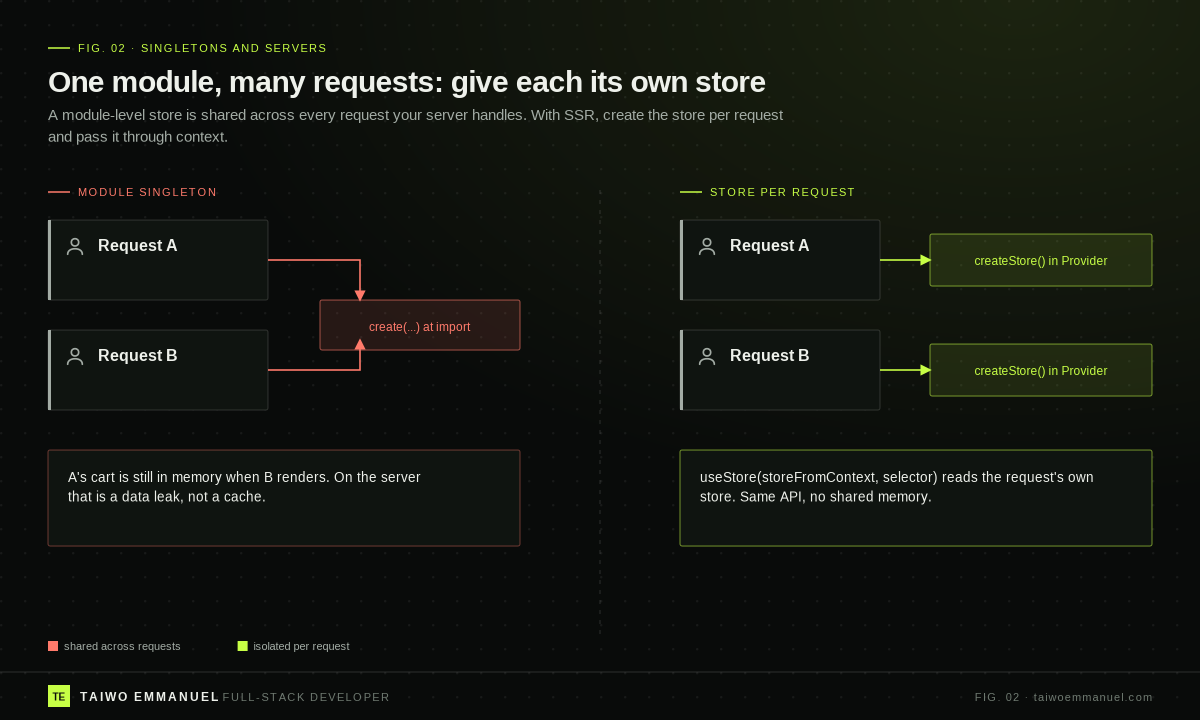
- On websites that are built on the server, one visitor's information can leak to another if the shared store is set up carelessly.

The big idea: ask for only what you need, and split by feature
The habits that fix these problems are simple:
- Each part of the screen asks for exactly the pieces it uses, nothing more. Then it only redraws when those pieces change.
- The store is split into small sections by feature, such as basket, user and filters, each with its own file and owner.
- On server-built websites, each visitor gets their own fresh store, so nothing is ever shared between people.
How to do it
1. Ask for single values
Instead of reading the whole store, each component reads one or two values, like the number of items in the basket. Tools like the React Compiler help, but they cannot fix a component that asks for everything.
2. Split the store into slices
I give each feature its own slice of the store with a clear name and a short list of actions, such as "add to basket" or "clear filters". New team members can find what they need, and changes stay contained.
3. Create one store per visitor on server-built pages
With frameworks like Next.js, pages are often prepared on the server. A single shared store on the server would be shared by every visitor at the same time. Creating a fresh store for each visit prevents that entirely.
4. Keep server data out of it
Products, orders and balances belong with the server and a tool built to keep them fresh. The shared store is for small things only the browser cares about. That single rule keeps the store small for the life of the app.
Takeaway
As apps grow, shared information either stays tidy or slowly becomes the thing everyone is afraid to touch. Let each screen ask only for what it needs, split the store by feature, give each visitor their own store on server-built pages, and keep server data elsewhere. The app stays fast, and changes stay safe.
References
- 1. How to migrate to v5 from v4 — Zustand docs
- 2. Zustand v5.0.0 release notes — pmndrs/zustand on GitHub, October 2024
- 3. Slices pattern — Zustand docs
- 4. Setup with Next.js — Zustand docs
- 5. React Compiler — React docs