/WRITING · AI IN PRODUCTS
Human-in-the-loop approvals for AI agents, modelled with Zustand
Letting AI take actions on its own is useful until it does something you did not want. An approval step, where a person checks and confirms before anything important happens, is the simplest safety net. Here is how I design one.
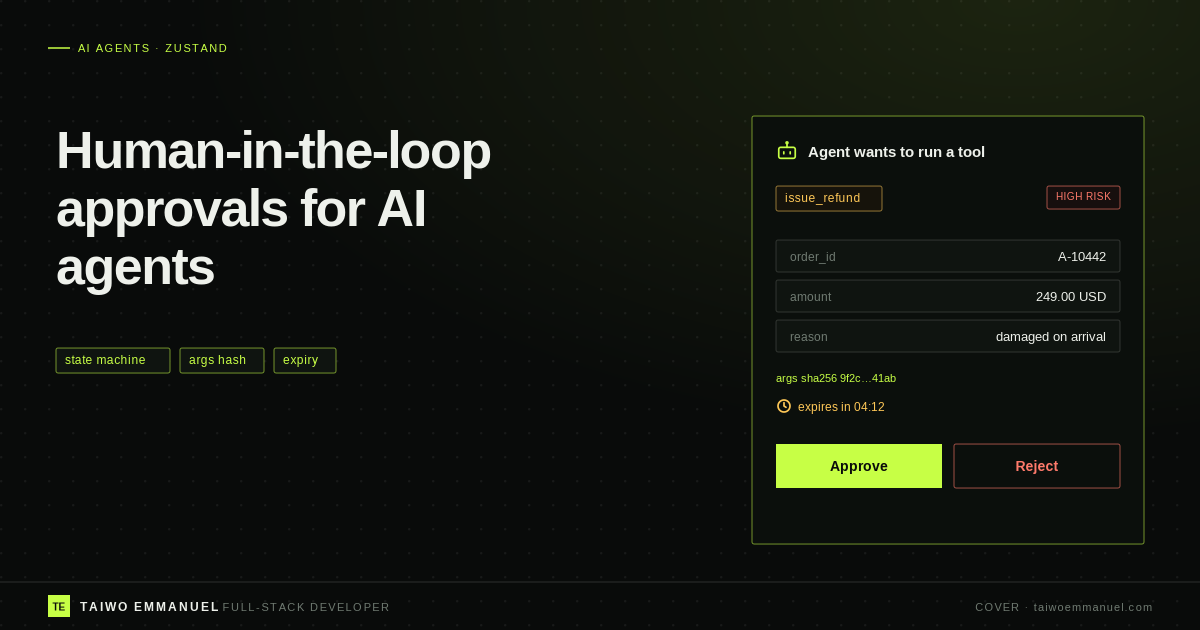
AI tools are moving from answering questions to taking actions: sending emails, issuing refunds, updating records, booking things. That is where they become genuinely useful, and also where a mistake stops being a wrong sentence and becomes a wrong payment.
The simplest protection is old-fashioned: before the AI does anything important, a person looks at it and says yes or no. People call this "human in the loop". It sounds easy. Doing it well takes a bit of care, and this post is about that care.
The problem: an approve button is easy to get wrong
The quick version of an approval step is a pop-up that says "The assistant wants to issue a refund. Approve?" with two buttons. It looks safe. In practice it has three weak spots:
- It often does not show the details. Refund how much, to whom, for which order?
- Things can change between the moment you look and the moment it runs. The amount you approved may not be the amount that gets sent.
- Double clicks, slow connections and two people reviewing at once can produce two decisions for one request.
None of these is theoretical. In the February 2025 Bybit hack, the people approving a transfer saw a normal-looking screen while something very different was actually being signed. The approval step existed. It just was not telling the truth.
The big idea: approve exactly what will run, nothing else
A good approval step follows one rule: what you see is exactly what will happen. To get there, I design approvals around three ideas.
- Show the real details in plain words: the action, the amount, the person or account affected, and anything unusual.
- Tie the approval to those exact details. If anything changes after you look, the approval no longer counts and you are asked again.
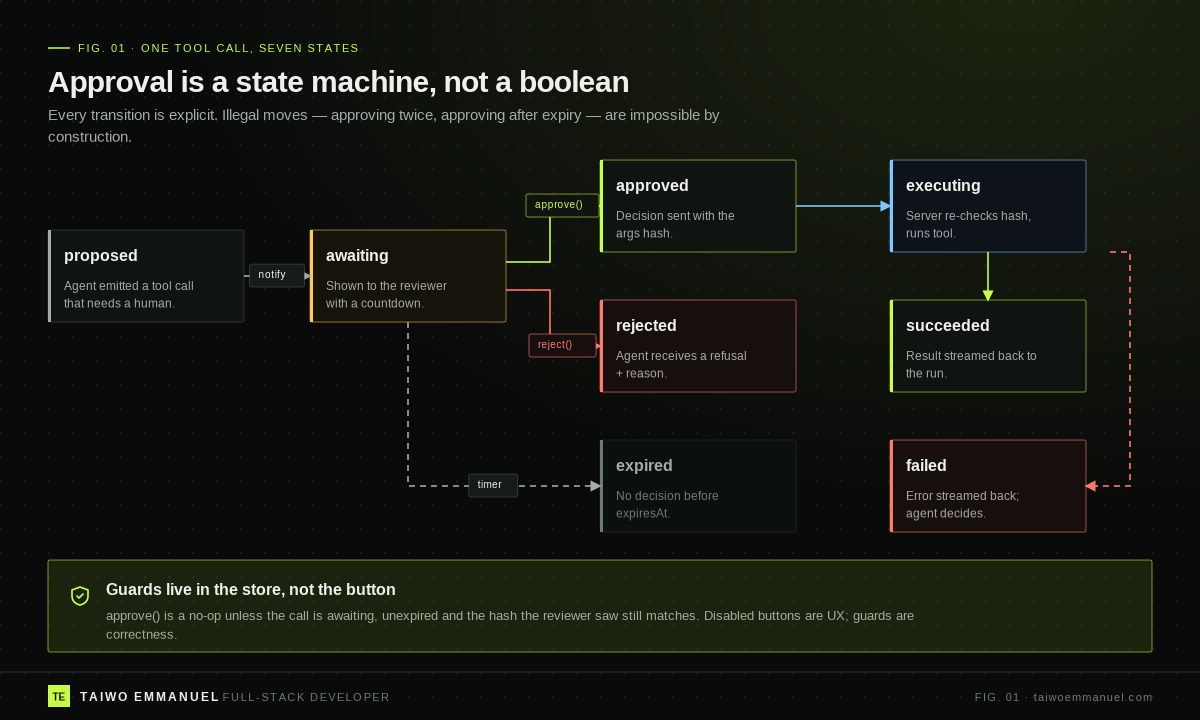
- Give every request clear stages, so it can only be approved once, cannot run before it is approved, and cannot be approved after it was rejected.
How to do it
1. Write the stages down before building the screen
I list every stage a request can be in (waiting, approved, rejected, running, done, failed) and which moves between them are allowed. This sounds like paperwork, but it is what stops a stray double click from approving something twice.
2. Show a clear summary, not raw data
The approval screen describes the action the way a person would: "Refund 45,000 naira to Ada Obi for order 1182." Anything unusual, like a first-time recipient or a larger-than-normal amount, is highlighted.
3. Lock the details at the moment of approval
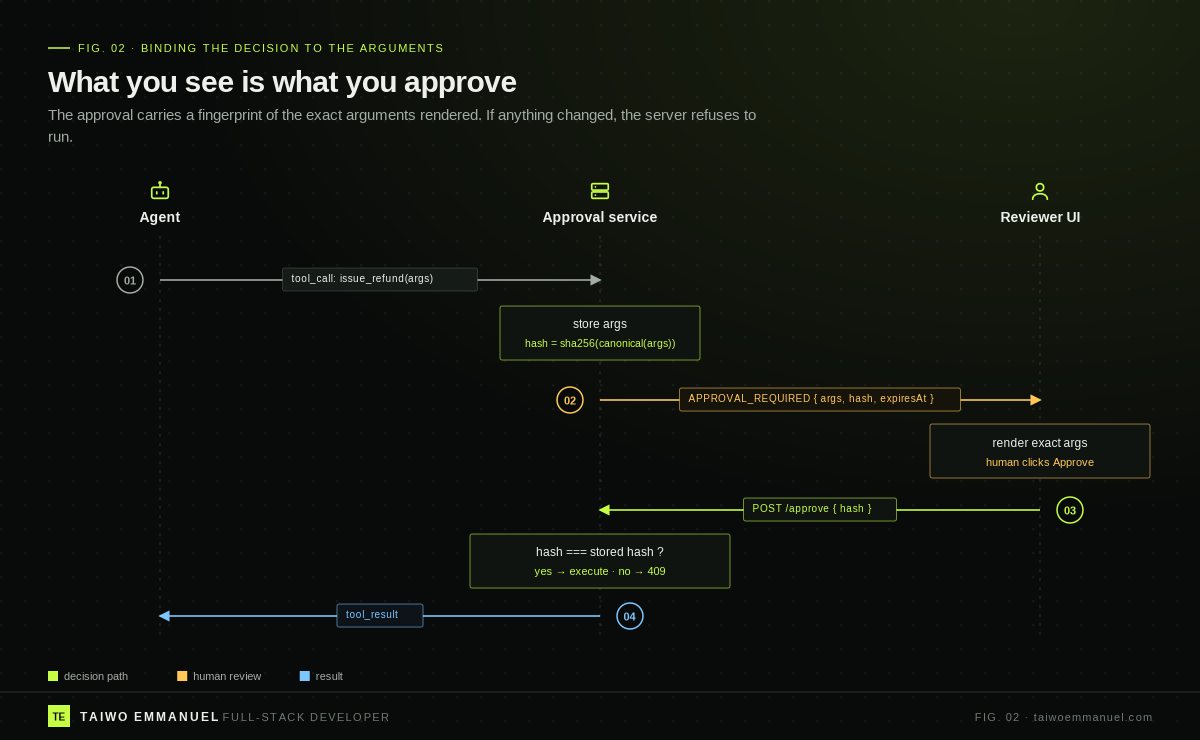
When the AI proposes an action, the server saves the exact details and creates a fingerprint of them. The approval sends that fingerprint back. Just before running, the server checks the fingerprint again. If someone or something changed the details in between, the action does not run.
4. Keep the screen logic simple and predictable
On the screen side, I keep the approval stages in one small store (I use Zustand) so every button reads from the same source of truth. Buttons are disabled automatically when an action is not allowed in the current stage.
What this means if you are adding AI to your product
If your AI can spend money, contact customers or change records, insist on an approval step for those actions, and test it with a simple question: if the details changed after I looked, would I notice? If the answer is no, the approval is decoration.
Takeaway
Approval steps are the cheapest safety net an AI feature can have. Show real details in plain words, tie the approval to exactly those details, and give every request clear stages. Then the person clicking Approve is actually in control.
References
- 1. In-depth technical analysis of the Bybit hack — NCC Group, 2025
- 2. OWASP Top 10 for LLM Applications — OWASP GenAI Security Project
- 3. Mutations — TanStack Query docs
- 4. Zustand: introduction — Zustand docs
- 5. RFC 8785: JSON Canonicalization Scheme (JCS) — IETF, 2020