/WRITING · SECURITY
Polymarket, Bybit, Binance: your third parties are your attack surface
On the day Binance was drained, Polymarket paused trading after malicious JavaScript arrived through a third-party provider. Bybit's 2025 loss also began in a vendor's front-end code. Here is how a script tag becomes a breach, and six layers of defence for React and Next.js apps.
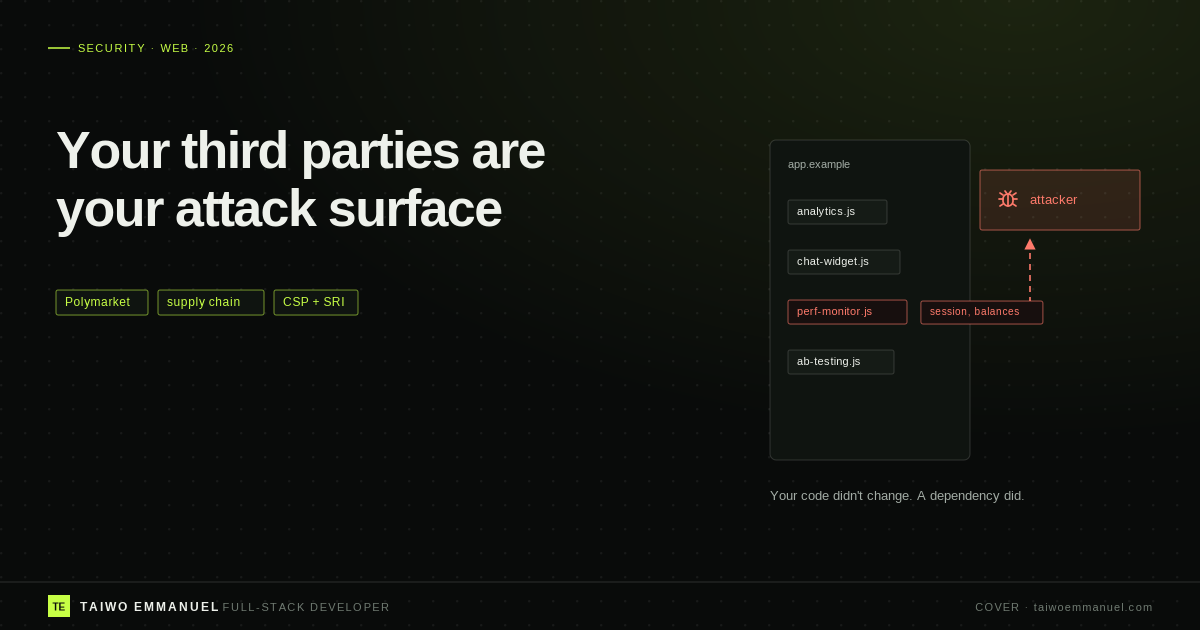
On 29 October 2026, while the industry was watching Binance lose about 6.3 billion dollars, a smaller incident told a more common story. Polymarket temporarily halted trading after malicious JavaScript, delivered through a compromised third-party software provider, began targeting users' active trading sessions. Losses were measured in millions rather than billions, but the mechanism is one almost every web app shares: code you did not write, running on your page with your privileges.
I wrote separately about the Binance incident and about clear signing in React. This post is about the quieter risk: the script tags in our own layouts.
The problem: a script tag is a full trust delegation
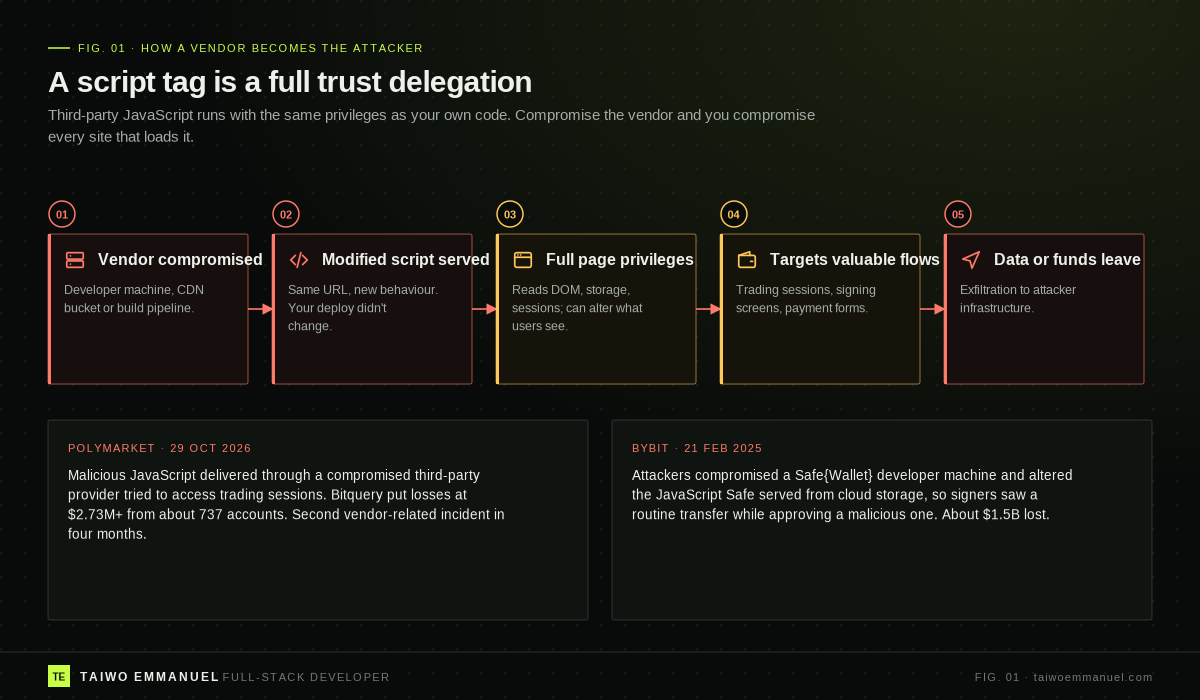
When you add a third-party script to a page, it can read the DOM, read storage your own code can read, make requests and change what users see. If the vendor is compromised, the attacker inherits all of that, on every site that loads the script, without any change to those sites' code.
That is what happened at Polymarket, according to reporting compiled by BleepingComputer, Cybernews and others. Hudson Rock found malicious JavaScript distributed through the provider's infrastructure that tried to access trading sessions. BleepingComputer reported the script communicated with a domain belonging to a web-performance monitoring service; the vendor had not been officially named at the time of writing. Blockchain analysts at Bitquery put losses at at least $2.73 million across roughly 737 accounts, and Polymarket said affected users would be made whole. It was the platform's second vendor-related front-end incident in about four months: in June, injected code drained about $3 million from fewer than 15 accounts.
Bybit's February 2025 loss followed the same pattern at a larger scale. NCC Group's analysis describes how a compromised Safe{Wallet} developer machine was used to alter the front-end JavaScript Safe served from cloud storage, so signers saw a routine transfer while approving a malicious transaction.
The insight: shrink what third parties can see, change and send
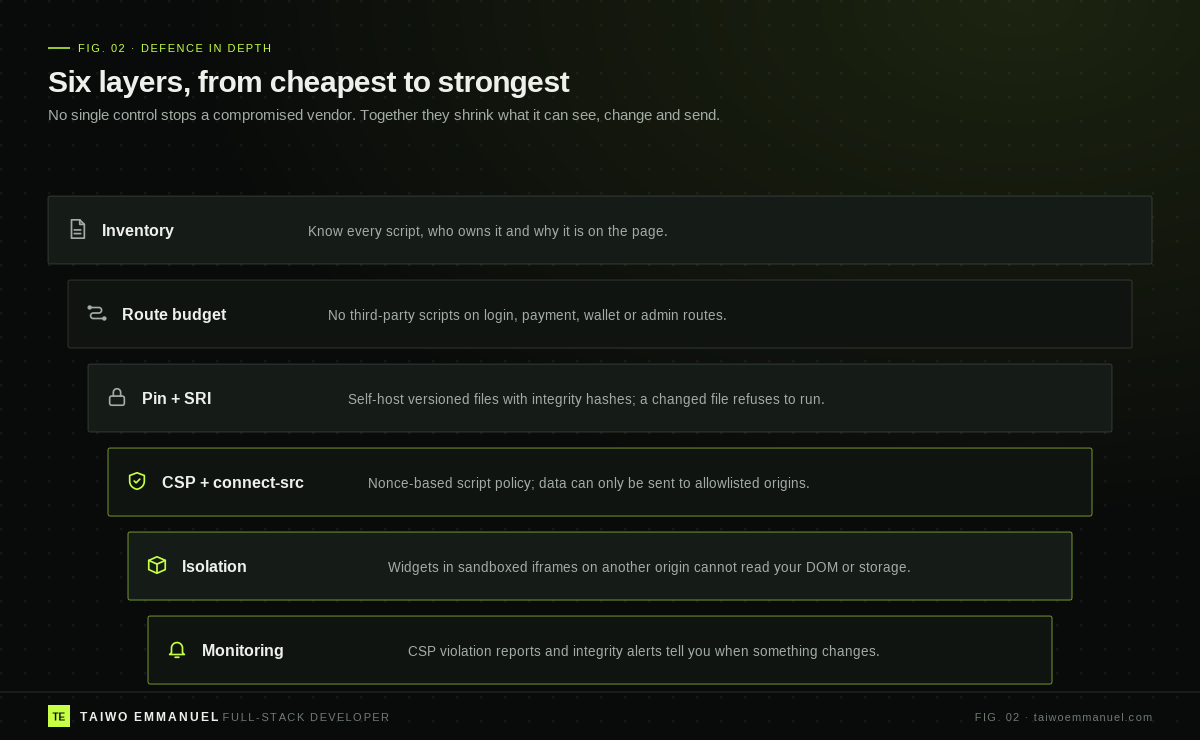
You cannot audit every vendor's build pipeline. You can decide where their code runs, what it is allowed to load, and where it is allowed to send data. Security for third-party code is less about trusting vendors and more about reducing the damage any one of them can do.
The cheapest controls are organisational: know what you load, and keep third parties off the routes that matter most. The strongest are technical: integrity checks that refuse changed files, a Content Security Policy that restricts what scripts run and where they can send data, and isolation that keeps widgets out of your page context entirely.
Implementation walkthrough
Step 1: a route budget for third-party code
The pages where money moves, credentials are entered or admins act should load nothing you did not build. Make that a rule in code, not a convention.
 TAIWO EMMANUEL / CODE NOTE
"use client";
import { usePathname } from "next/navigation";
import Script from "next/script";

// Routes where money moves, credentials are entered or admins act: no third-party code at all.
const SENSITIVE = [/^\/login/, /^\/checkout/, /^\/wallet/, /^\/admin/, /^\/sign/];

export const thirdPartyAllowed = (pathname: string) => !SENSITIVE.some((rx) => rx.test(pathname));

// Rendered once in the root layout: analytics load only where the budget allows.
export function ThirdPartyScripts({ nonce }: { nonce?: string }) {
  const pathname = usePathname();
  if (!thirdPartyAllowed(pathname)) return null;
  return <Script src="/vendor/analytics-4.2.1.js" strategy="afterInteractive" nonce={nonce} />;
}
Step 2: pin versions and verify integrity
Where a vendor publishes versioned files, self-host the exact version and add a Subresource Integrity hash. If the file changes, the browser refuses to run it. This does not work for scripts a vendor deliberately changes behind a stable URL, which is precisely why those scripts belong only on low-risk pages.
TAIWO EMMANUEL / CODE NOTE<!-- Generate the hash with: openssl dgst -sha384 -binary analytics-4.2.1.js | openssl base64 -A -->
<script
src="/vendor/analytics-4.2.1.js"
integrity="sha384-REPLACE_WITH_REAL_HASH"
crossorigin="anonymous"
defer
></script>Step 3: a nonce-based Content Security Policy with a tight connect-src
A strict CSP allows only scripts carrying a per-request nonce, and connect-src limits where any script, compromised or not, can send data. In Next.js the documented approach is to generate the nonce in middleware.
TAIWO EMMANUEL / CODE NOTEimport { NextResponse, type NextRequest } from "next/server";
export function middleware(request: NextRequest) {
const nonce = Buffer.from(crypto.randomUUID()).toString("base64");
const csp = [
"default-src 'self'",
`script-src 'self' 'nonce-${nonce}' 'strict-dynamic'`,
"connect-src 'self' https://api.example.com https://analytics.example.com", // nowhere else
"frame-src https://widgets.example.com",
"object-src 'none'",
"base-uri 'self'",
"report-to csp",
].join("; ");
const headers = new Headers(request.headers);
headers.set("x-nonce", nonce);
const response = NextResponse.next({ request: { headers } });
response.headers.set("Content-Security-Policy", csp);
response.headers.set("Reporting-Endpoints", 'csp="https://example.com/api/csp-reports"');
return response;
}
With connect-src locked down, a compromised analytics script cannot simply post stolen session data to an attacker's domain: the browser blocks the request and sends you a violation report. Start in Content-Security-Policy-Report-Only mode to find what breaks, then enforce.
Step 4: isolate widgets you cannot constrain
Chat widgets and embedded tools that need broad network access are best served from a separate origin inside a sandboxed iframe. Code in that frame cannot read your page's DOM, cookies or storage, and communicates only through messages you validate.
Takeaway
- Third-party JavaScript runs with your page's privileges; a compromised vendor is a compromised site.
- Polymarket's October 2026 incident and Bybit's 2025 loss both started in vendor front-end code.
- Keep third parties off sensitive routes, pin and integrity-check what you can, enforce a nonce-based CSP with a tight connect-src, isolate widgets, and monitor violation reports.
References
- 1. Polymarket halts trading after crypto-draining script breach — BleepingComputer, October 2026
- 2. Polymarket to compensate users after vendor-related attack — ForkLog, October 2026
- 3. Polymarket confirms $3 million loss in third-party front-end supply chain breach — The Defiant, June 2026
- 4. Binance's $6.3 billion hack raises questions about crypto wallet safety — CNBC, 31 October 2026
- 5. In-depth technical analysis of the Bybit hack — NCC Group, 2025
- 6. Third Party JavaScript Management Cheat Sheet — OWASP
- 7. Subresource Integrity — MDN
- 8. Content Security Policy guide — Next.js docs