/WRITING · SECURITY
Clear signing in React: building a transaction preview users can trust
Bybit's signers approved what their screens showed them, and the screens lied. Here is how I build a React signing flow that decodes, simulates and risk-checks every request, and only unlocks the button for a fresh preview of the exact bytes being signed.
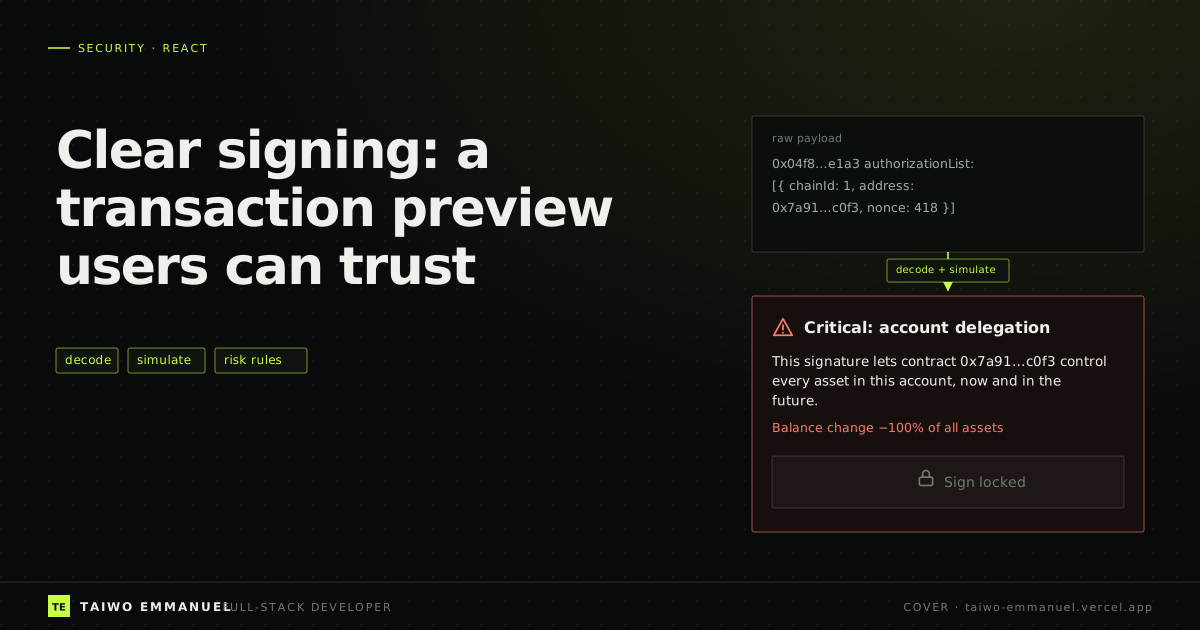
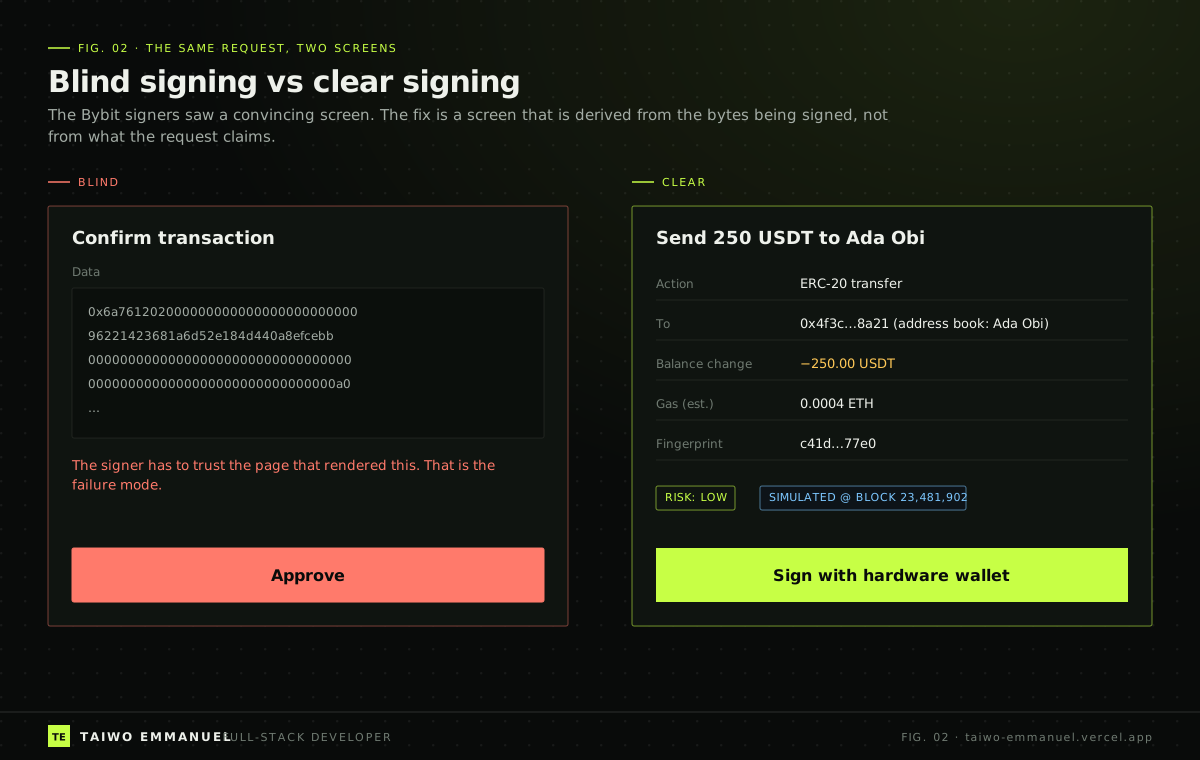
In February 2025, Bybit's signers approved a transaction that their interface described as a routine transfer between the exchange's own wallets. It was not routine. Injected JavaScript had swapped the payload for a delegatecall that handed control of the cold wallet to attackers, and about 1.5 billion dollars left in minutes. Their hardware wallets could not show enough detail to contradict the screen, so they signed blind.
In October 2026, Binance's hot-wallet losses broke a different layer, which I unpack in my post on the 6.3 billion dollar Binance hack. But one lesson connects both incidents and lands squarely on frontend engineers: whatever a person approves must be derived from the bytes being signed, and from nothing else.
The problem: approval screens describe requests, not payloads
Most signing UIs render a description that travels alongside the transaction: a title, an amount, a recipient. That metadata comes from the same system that built the transaction, so if that system is compromised, the description is too. The bytes, meanwhile, are shown as hex, if at all.
Blind signing is the result. The person is technically in the loop but cannot exercise judgment, because the only thing they can read is the thing an attacker controls.
The insight: derive the preview, then bind the button to it
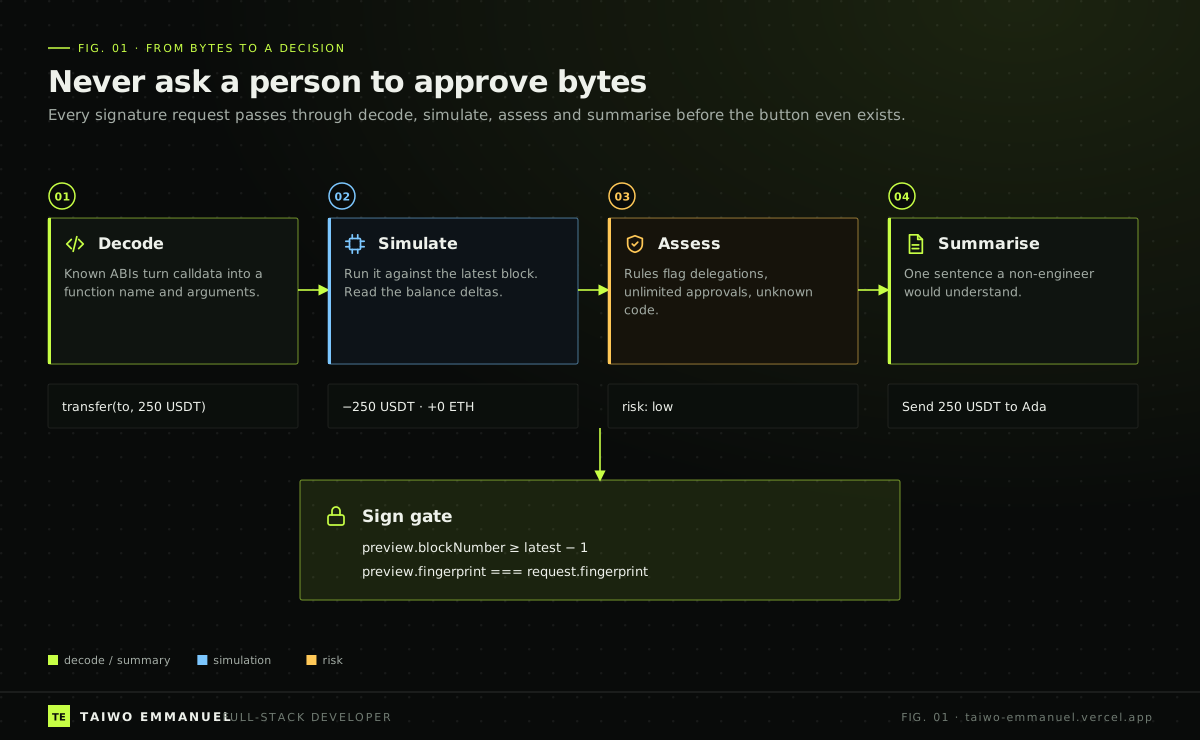
A trustworthy preview is computed, not supplied. It decodes the payload with known contract ABIs, simulates it against the current chain state to see what actually changes, applies risk rules that a security team owns, and only then writes the plain-language summary. Two conditions then gate the sign button: the preview must be fresh, and its fingerprint must match the request being signed.
In React terms, decoding is a pure function, simulation is server state that goes stale every block (TanStack Query), and the signing session — what the reviewer has seen, acknowledged and is about to sign — is client state with strict transitions (Zustand).
Implementation walkthrough
Step 1: decode with known ABIs and classify risk
I use viem for decoding. Unknown function selectors are not an error; they are a risk signal. Delegations, which in the EIP-7702 world arrive as an authorization list of chain id, delegate address and nonce, are always surfaced first and in the strongest language, because they hand over the account itself.
 TAIWO EMMANUEL / CODE NOTE
import { decodeFunctionData, erc20Abi, maxUint256, type Hex } from "viem";

export type Authorization = { chainId: number; address: Hex; nonce: number }; // EIP-7702 tuple
export type TxRequest = { to: Hex; data: Hex; value: bigint; authorizationList?: Authorization[] };

export type Risk = { level: "low" | "medium" | "critical"; reasons: string[] };
export type Decoded = { summary: string; functionName?: string; args?: readonly unknown[] };

export function decode(tx: TxRequest): Decoded {
  if (tx.authorizationList?.length) {
    const targets = tx.authorizationList.map((a) => a.address).join(", ");
    return { summary: `Delegate control of this account to ${targets}` };
  }
  try {
    const { functionName, args } = decodeFunctionData({ abi: erc20Abi, data: tx.data });
    return { summary: `${functionName} on token ${tx.to}`, functionName, args };
  } catch {
    return { summary: "Unknown contract call. The function could not be decoded." };
  }
}

export function assess(tx: TxRequest, decoded: Decoded, knownContracts: ReadonlySet<string>): Risk {
  const reasons: string[] = [];
  if (tx.authorizationList?.length) reasons.push("Account delegation: the delegate gains control of every asset.");
  if (decoded.functionName === "approve" && decoded.args?.[1] === maxUint256) reasons.push("Unlimited token approval.");
  if (!decoded.functionName && !tx.authorizationList?.length) reasons.push("Payload could not be decoded.");
  if (!knownContracts.has(tx.to.toLowerCase())) reasons.push("Interacting with a contract outside your address book.");
  const level = tx.authorizationList?.length || decoded.functionName === undefined ? "critical" : reasons.length ? "medium" : "low";
  return { level, reasons };
}
Step 2: simulate as server state that expires every block
Simulation answers the question decoding cannot: what will actually change? I run it through a backend endpoint (an eth_call or a simulation provider) and treat the result as a query keyed by the transaction fingerprint and block number. When a new block arrives, the preview is stale, and the query refetches. staleTime is short on purpose.
TAIWO EMMANUEL / CODE NOTEimport { useQuery } from "@tanstack/react-query";
import { keccak256, toHex } from "viem";
import type { TxRequest } from "./assess";
export const fingerprint = (tx: TxRequest) =>
keccak256(toHex(JSON.stringify(tx, (_key, value) => (typeof value === "bigint" ? value.toString() : value))));
export type Simulation = { blockNumber: number; balanceChanges: { asset: string; delta: string }[]; reverted: boolean };
export function useSimulation(tx: TxRequest, latestBlock: number | undefined) {
const id = fingerprint(tx);
return useQuery({
queryKey: ["simulation", id, latestBlock],
enabled: latestBlock !== undefined,
queryFn: async ({ signal }) => {
const response = await fetch("/api/simulate", {
method: "POST",
headers: { "Content-Type": "application/json" },
body: JSON.stringify({ tx, blockNumber: latestBlock }, (_k, v) => (typeof v === "bigint" ? v.toString() : v)),
signal,
});
if (!response.ok) throw new Error("Simulation failed");
return { fingerprint: id, ...((await response.json()) as Simulation) };
},
staleTime: 4_000,
// Deliberately no placeholderData (e.g. keepPreviousData): the previous block's preview must never pose as current.
});
}Note what is missing: placeholderData. With the popular keepPreviousData placeholder, the UI would keep showing the last block's balance changes while the new simulation runs. For most screens that is a nice touch. For a signing screen it is exactly the wrong behaviour.
Step 3: a signing session with strict transitions
The session records what the reviewer actually saw: the fingerprint and block of the preview on screen, and whether they acknowledged a critical warning. Signing is only reachable from the reviewing state, and only for the fingerprint that was reviewed.
TAIWO EMMANUEL / CODE NOTEimport { create } from "zustand";
type Phase = "reviewing" | "signing" | "submitted" | "aborted";
type SigningSession = {
phase: Phase;
reviewed: { fingerprint: string; blockNumber: number } | null;
criticalAcknowledged: boolean;
markReviewed: (fingerprint: string, blockNumber: number) => void;
acknowledgeCritical: () => void;
beginSigning: (requestFingerprint: string, latestBlock: number) => boolean;
finish: (outcome: "submitted" | "aborted") => void;
};
export const useSigningSession = create<SigningSession>()((set, get) => ({
phase: "reviewing",
reviewed: null,
criticalAcknowledged: false,
markReviewed: (fingerprint, blockNumber) => set({ reviewed: { fingerprint, blockNumber } }),
acknowledgeCritical: () => set({ criticalAcknowledged: true }),
beginSigning: (requestFingerprint, latestBlock) => {
const { phase, reviewed } = get();
const fresh = reviewed !== null && reviewed.blockNumber >= latestBlock - 1;
if (phase !== "reviewing" || !fresh || reviewed.fingerprint !== requestFingerprint) return false;
set({ phase: "signing" });
return true;
},
finish: (outcome) => set({ phase: outcome }),
}));
Step 4: the button is the last thing to unlock
Putting it together, the review component renders the decoded summary, the simulation and the risk reasons; records what was shown; and enables signing only when every condition holds. Critical risks require an explicit acknowledgement, and for some teams they should require a different person entirely.
TAIWO EMMANUEL / CODE NOTEimport { useEffect } from "react";
import { assess, decode, type TxRequest } from "./assess";
import { fingerprint, useSimulation } from "./use-simulation";
import { useSigningSession } from "./signing-session";
export function SignReview({ tx, latestBlock, knownContracts, onSign }: {
tx: TxRequest; latestBlock: number; knownContracts: ReadonlySet<string>; onSign: () => Promise<void>;
}) {
const decoded = decode(tx);
const risk = assess(tx, decoded, knownContracts);
const simulation = useSimulation(tx, latestBlock);
const { markReviewed, beginSigning, criticalAcknowledged, acknowledgeCritical, finish } = useSigningSession();
useEffect(() => {
if (simulation.data) markReviewed(simulation.data.fingerprint, simulation.data.blockNumber);
}, [simulation.data, markReviewed]);
const ready = simulation.isSuccess && !simulation.data.reverted && (risk.level !== "critical" || criticalAcknowledged);
return (
<section aria-labelledby="sign-title">
<h2 id="sign-title">{decoded.summary}</h2>
<ul>{risk.reasons.map((reason) => <li key={reason}>{reason}</li>)}</ul>
{simulation.isPending ? <p>Simulating against the latest block…</p> : null}
{simulation.data ? (
<dl>{simulation.data.balanceChanges.map((c) => <div key={c.asset}><dt>{c.asset}</dt><dd>{c.delta}</dd></div>)}</dl>
) : null}
{risk.level === "critical" ? (
<label><input type="checkbox" onChange={acknowledgeCritical} /> I understand this can transfer control of the account</label>
) : null}
<button
disabled={!ready}
onClick={async () => {
if (!beginSigning(fingerprint(tx), latestBlock)) return;
try { await onSign(); finish("submitted"); } catch { finish("aborted"); }
}}
>
Sign with hardware wallet
</button>
</section>
);
}Takeaway
- A preview supplied alongside a request is only as trustworthy as whoever built the request. Derive it from the payload.
- Decode, simulate, assess, summarise: four steps, each with a clear owner and a clear test.
- Treat simulation as server state that expires every block, and never show the previous block's preview as current.
- Bind the sign action to the exact fingerprint and block the reviewer saw. The button should be the last thing on the screen to become possible.
A browser can never be fully trusted, which is why hardware wallets with on-device clear signing matter. But the interface in front of them can stop lying, and that alone would have changed the outcome of at least one billion-dollar morning.
References
- 1. In-depth technical analysis of the Bybit hack — NCC Group, 2025
- 2. EIP-7702: Set code for EOAs — Ethereum Improvement Proposals
- 3. EIP-712: Typed structured data hashing and signing — Ethereum Improvement Proposals
- 4. decodeFunctionData — viem docs
- 5. Placeholder query data — TanStack Query docs
- 6. Zustand: introduction — Zustand docs